Best Sermon Clip Maker Software for Churches in 2026
Your pastor delivers life-changing messages every week. But without the right tools to transform those sermons into shareable clips, your reach stays limited to Sunday morning. This comprehensive guide compares the top sermon clip maker software options for churches in 2026—from free tools to AI-powered platforms that do the work for you.
Free Guide: 10 Ways to Grow Your Church's Digital Reach
Practical strategies churches of every size are using to reach more people online — no budget required.
What We'll Cover
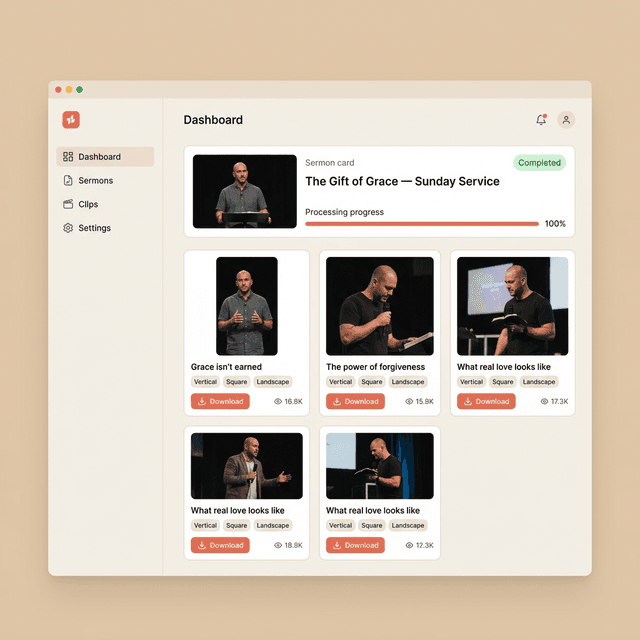
Why You Need Dedicated Sermon Clip Software
Let's start with the reality most church communications teams face: creating sermon clips manually is a time black hole. Between watching through the full sermon, identifying key moments, cutting clips, adding captions, formatting for different platforms, and adding branding—you're looking at 4-8 hours of work per sermon. Multiply that by 52 weeks, and you've got a full-time job just for clip creation.
Dedicated sermon clip software solves this by automating the tedious parts while ensuring consistent quality. The best tools understand church content specifically—they know what makes a moment spiritually impactful, not just "engaging" in the generic social media sense.
The Time Math
Manual clip creation: 4-8 hours/week × 52 weeks = 208-416 hours/year
With AI software: 30 min/week × 52 weeks = 26 hours/year
Time saved: 180-390 hours annually—that's 4-9 full work weeks back in your team's calendar.
The Multiplication Effect
Beyond time savings, the right software unlocks a multiplication effect for your message. A single sermon can become 5-7 clips, each optimized for different platforms, reaching different audiences at different times throughout the week. This isn't about being everywhere—it's about being where your congregation (and potential visitors) already spend their time.
- Consistency: Post quality clips every week without burnout or missed weeks
- Platform optimization: Auto-format for TikTok, Instagram, YouTube Shorts, and Facebook
- Brand consistency: Maintain visual identity across all clips automatically
- Accessibility: Auto-captions ensure 85% of scrollers who watch muted can still receive the message
Essential Features to Look For
Not all video editing software is created equal for church use. Here are the features that separate adequate tools from game-changing ones:
AI Moment Detection
The best software doesn't just transcribe—it understands. Look for AI that identifies:
- Emotional peaks and pauses
- Quotable one-liners
- Story climaxes
- Call-to-action moments
- Audience reactions (laughter, applause)
Auto-Vertical Formatting
Most sermons are recorded in horizontal (16:9). Social platforms demand vertical (9:16). Great software automatically:
- Crops to vertical while keeping the speaker centered
- Tracks speaker movement for dynamic framing
- Adds safe zones for platform UI elements
- Exports multiple aspect ratios from one source
Caption Quality & Customization
Captions are non-negotiable. Essential caption features:
- High accuracy (especially with Biblical names)
- Custom fonts, colors, and positioning
- Word-by-word or phrase-by-phrase timing options
- Easy editing for corrections
- Emphasis styling (bold, highlight, color)
Church-Specific Understanding
Generic tools optimize for "engagement." Church tools should optimize for:
- Spiritual impact over shock value
- Complete thoughts (not mid-sentence cuts)
- Context-appropriate hooks
- Respectful framing of sensitive topics
Nice-to-Have Features
Direct Publishing
Post directly to social platforms from the tool
Scheduling
Queue clips for optimal posting times
Analytics Dashboard
Track performance across platforms
Team Collaboration
Multiple users, approval workflows
Quote Card Generator
Turn quotes into shareable images
Audiogram Creation
Waveform videos for podcast clips
Top 10 Sermon Clip Makers Compared
We've tested dozens of tools and narrowed it down to the 10 best options for churches in 2026. Here's how they stack up:
1. Sermon Clips
The set-and-forget solution built for churches
from $9.99/week
First 2 sermons free
Strengths:
- ✓ Built specifically for church content
- ✓ AI tuned for sermon content
- ✓ Clips typically ready the same day
- ✓ Vertical 9:16 with speaker tracking
- ✓ Word-timed captions burned in
Best For:
Churches that want professional clips without dedicating staff time. Upload your sermon, receive polished clips—it's that simple.
2. Opus Clip
AI-powered viral clip detection
$19-99/mo
Free tier available
Strengths:
- ✓ Excellent AI moment detection
- ✓ "Virality score" for each clip
- ✓ Auto face tracking
- ✓ B-roll suggestions
Limitations:
- × Not church-specific
- × May prioritize "viral" over spiritual
- × Requires more manual curation
Best For: Tech-savvy teams comfortable reviewing AI suggestions and making selections.
3. Descript
Edit video like a document
$12-24/mo
Free tier available
Strengths:
- ✓ Revolutionary transcript-based editing
- ✓ Excellent for podcasters too
- ✓ Remove filler words automatically
- ✓ AI voice cloning for corrections
Limitations:
- × No auto clip detection
- × Learning curve for full features
- × Manual vertical formatting
Best For: Churches that also produce podcasts and want one tool for everything.
4. CapCut
Powerful free option from TikTok's parent company
Free
Pro $9.99/mo
Strengths:
- ✓ Completely free for most features
- ✓ Excellent auto-captions
- ✓ TikTok-optimized templates
- ✓ Mobile + desktop apps
Limitations:
- × Manual clip selection required
- × No church-specific features
- × Time-intensive workflow
Best For: Small churches with volunteer help and more time than budget. See our guide on free sermon clip makers.
5. Pulpit AI
Church-focused AI repurposing platform
$29-79/mo
Strengths:
- ✓ Designed specifically for churches
- ✓ Creates clips + devotionals + quotes
- ✓ Good multi-format output
- ✓ Growing feature set
Limitations:
- × Newer platform, fewer integrations
- × AI quality still improving
- × Limited customization options
Best For: Churches wanting an all-in-one repurposing solution beyond just video clips.
6. Canva
The design tool with growing video features
Free-$15/mo
Nonprofit discount
Strengths:
- ✓ Many churches already use it
- ✓ Great templates library
- ✓ Easy team sharing
- ✓ Auto-captions added in 2025
Limitations:
- × Not built for video editing
- × No AI clip detection
- × Limited video features
Best For: Churches already in Canva who want to add basic video without a new tool.
7. Vizard
AI-powered repurposing with templates
$24-99/mo
Strengths:
- ✓ Good AI clip suggestions
- ✓ Quick turnaround
- ✓ Clean interface
- ✓ Direct YouTube import
Limitations:
- × Generic (not church-specific)
- × Limited caption styling
- × No human review
Best For: Quick clip generation when speed matters more than polish.
8. Adobe Premiere Rush
$9.99/mo with Creative Cloud
Pro-level features, significant learning curve. Best for churches with existing Adobe subscriptions.
9. Gloo Content Studio
Custom pricing
Part of Gloo's church platform. Good if you're already in the ecosystem.
10. InShot
Free (Pro $35/year)
Mobile-first editing. Great for on-the-go edits, limited desktop features.
Best Options by Church Size
The right tool depends on your church's resources, goals, and existing workflow. Here's our recommendation matrix:
Small Church (Under 200 attendance)
Budget Option
CapCut Free
$0/month
Best Value
Sermon Clips Weekly Pass
$9.99/week
If Time-Rich
Canva + Descript
~$25/month
Medium Church (200-1,000 attendance)
DIY-Focused
Opus Clip Pro
$49/month
Best Value
Sermon Clips Founding Pastor
$23.99/month, locked for life
Multi-Format
Pulpit AI
$79/month
Large Church (1,000+ attendance)
Full Control
Descript + Editor
Custom
Best Value
Sermon Clips Founding Pastor
$23.99/month, locked for life
Enterprise
Custom solution
Contact sales
AI vs. Manual Editing: Which is Right?
The 2026 landscape has shifted dramatically toward AI-assisted editing, but there's still a place for manual approaches. Here's how to decide:
Choose AI-Powered Tools If:
- Your team is stretched thin on time
- Consistency matters more than perfection
- You want to post more frequently
- You don't have dedicated video staff
- Your pastor's delivery is naturally clip-friendly
Choose Manual Editing If:
- You have a skilled video volunteer
- Your content needs heavy context
- You want maximum creative control
- Budget is extremely limited
- Quality of each clip > quantity of clips
The Hybrid Approach
Most successful churches in 2026 use a hybrid approach: AI handles the initial clip detection and basic formatting, while a human reviews, selects the best options, and makes final tweaks. This gives you 80% of the time savings while maintaining quality control.
Implementation Guide
Ready to implement a sermon clip workflow? Here's a practical roadmap:
Week 1: Audit & Select
Review your current video workflow. Choose 2-3 tools to trial. Most offer free trials—test them with a real sermon before committing.
Week 2: Establish Your Workflow
Document the process: Who uploads the sermon? Who reviews clips? Who posts? Create a simple checklist your team can follow every week.
Week 3-4: Build Your Library
Start creating clips consistently. Build up a backlog of 10-15 clips so you're never scrambling. Organize clips by topic for future reuse.
Month 2+: Optimize & Expand
Review analytics. What clips perform best? Adjust your selection criteria. Consider adding platforms or increasing posting frequency.
Frequently Asked Questions
What is the best free sermon clip maker software?
CapCut offers the best free sermon clip making experience with auto-captions, templates, and vertical formatting. For churches on a budget, it's an excellent starting point before upgrading to dedicated church software. See our full guide on free sermon clip makers.
How much does sermon clip software cost?
Sermon clip software ranges from free (CapCut, basic Canva) to $29-199/month for professional church-focused tools. Most churches find the $49-99/month range offers the best balance of automation and quality. Consider the time savings—if a $19/month tool saves 10 hours/month, that's $5.90/hour for professional clips.
Can AI automatically create sermon clips?
Yes, modern AI tools can automatically identify clip-worthy moments, generate captions, and format videos for multiple platforms with minimal human intervention. The best results come from tools trained specifically on sermon content, as they understand what makes a moment spiritually impactful—not just "engaging." Learn more in our AI sermon clip generator comparison.
What features should I look for in sermon clip software?
Essential features include auto-captioning, vertical video formatting, AI moment detection, multi-platform export, branding options, and ideally church-specific understanding for identifying spiritually impactful moments. Nice-to-haves include direct publishing, scheduling, analytics, and team collaboration features.
How many clips should we create per sermon?
Most churches find 3-5 clips per sermon is the sweet spot. This gives you enough content to post throughout the week without overwhelming your audience. Quality matters more than quantity—one powerful clip beats five mediocre ones.
Ready to Multiply Your Message?
Stop spending hours on video editing. With Sermon Clips, your message reaches further—automatically. Try it free and see the difference.
Try Sermon Clips FreeNo credit card required • Results in 24 hours