The Complete Guide to Creating Sermon Clips for Social Media in 2026
Transform your Sunday messages into engaging, shareable video clips that reach people where they already spend their time. This comprehensive guide covers everything from selecting the perfect moments to optimizing for each platform.
Free Guide: 10 Ways to Grow Your Church's Digital Reach
Practical strategies churches of every size are using to reach more people online — no budget required.
What You'll Learn
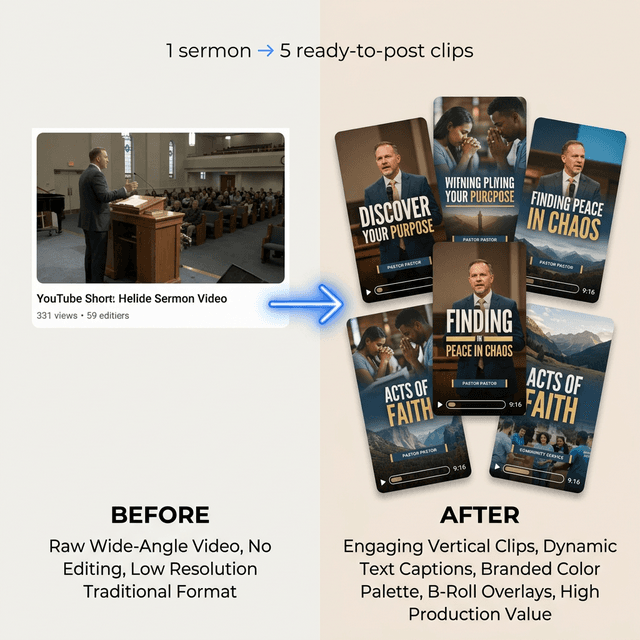
How It Works
Why Sermon Clips Matter for Church Growth
The average person scrolls through 300 feet of social media content daily. That's the height of the Statue of Liberty. In this endless scroll, churches have an unprecedented opportunity to reach people who would never walk through their doors—if they know how to capture attention in the first 2-3 seconds.
Sermon clips aren't just about repurposing content. They're about multiplying your pastor's impact. A single Sunday message, when properly clipped and distributed, can:
- Reach 10-50x more people than attended the live service
- Provide touchpoints throughout the week that keep your message alive
- Give members shareable content they can send to friends and family
- Create an evergreen library of searchable, discoverable wisdom
The Math That Changes Everything
If your church has 200 members on Instagram with an average of 300 followers each, and just 10% share your clip, you've potentially reached 6,000 new people—30x your Sunday attendance. This is the multiplication effect in action.
Finding the Perfect Moments to Clip
Not every part of a sermon makes a great clip. The best moments share specific characteristics that make them scroll-stopping, shareable, and impactful. Here's what to look for:
The 7 Types of Clip-Worthy Moments
1. The Hook Statement
A provocative or surprising opening that immediately grabs attention.
"The biggest lie you'll hear this week isn't from a politician or the news—it's from yourself."
2. The Quotable Truth
A concise, memorable statement that stands alone.
"Forgiveness isn't saying what they did was okay. It's saying what they did won't control your tomorrow."
3. The Vulnerable Moment
When the pastor shares a personal struggle or admission.
"I used to think prayer was about getting what I want. Took me 15 years to realize it was about becoming who God wants."
4. The Practical Application
Clear, actionable advice viewers can implement immediately.
"This week, before you respond in anger, take 3 breaths and ask: 'What am I really afraid of right now?'"
5. The Story Peak
The emotional climax of an illustration or testimony.
"And when I finally called my dad after 7 years of silence..."
6. The Counter-Cultural Challenge
Something that goes against mainstream thinking.
"Culture says 'find yourself.' Scripture says 'lose yourself'—and that's where you actually find purpose."
7. The Congregation Reaction
Moments that capture authentic audience response—laughter, applause, or visible emotion.
These clips show the energy of your community and make viewers want to be part of it.
What to Avoid
- Clips that require context to understand
- Inside jokes or references only regular attendees would get
- Purely theological teaching without practical application
- Moments where audio is unclear or there's background noise
Step-by-Step Editing Guide
Whether you're using professional software or AI tools, the editing process follows the same fundamental steps. Here's the complete workflow:
Step 1: Import and Transcribe
Upload your full sermon video to your editing tool. Most modern tools will automatically transcribe the audio, giving you a searchable text document of the entire message.
Pro tip: If your tool doesn't auto-transcribe, use a free service like Otter.ai or Descript's free tier to generate a transcript first.
Step 2: Identify Clip-Worthy Segments
Scan your transcript for the 7 types of moments mentioned above. Mark timestamps or highlight sections. Aim to identify 3-5 potential clips from each sermon.
Pro tip: Watch at 1.5x speed to save time while still catching emotional peaks and audience reactions.
Step 3: Cut and Trim
Extract your selected segments. For most platforms, aim for:
- TikTok: 15-60 seconds (under 30 optimal)
- Instagram Reels: 15-90 seconds
- YouTube Shorts: 15-60 seconds
- Facebook: 30-90 seconds
Pro tip: Don't feel pressured to use the whole clip. Often a 45-second moment can be tightened to 25 seconds by removing pauses and ums.
Step 4: Crop to Vertical
Convert your horizontal church recording to 9:16 vertical format. Focus on keeping the speaker's face and upper body centered. If your speaker moves around, you may need to keyframe the crop position.
Pro tip: Leave a little headroom for captions at the bottom of the frame. About 20% of the bottom should be "safe" for text overlay.
Step 5: Add Captions
This is non-negotiable. 85% of social media video is watched without sound. Auto-generate captions, then review for accuracy—especially with Biblical names, theological terms, and your pastor's speaking style.
Pro tip: Style your captions to match your brand. Bold key words for emphasis. Use colors that complement your church's palette.
Step 6: Add Hook Elements
The first 2-3 seconds determine whether someone keeps watching. Consider adding:
- A text overlay with the topic ("This changed my prayer life...")
- A subtle zoom-in animation
- A brief sound effect or musical sting
- Your church logo watermark (subtle, corner placement)
Step 7: Add Background Music (Optional)
Subtle background music can add emotion and professionalism. Keep it low (10-15% of speaking volume) and choose tracks that match the tone. Dramatic moments get cinematic scores; practical teaching gets soft ambient.
Pro tip: Use royalty-free music libraries like Artlist, Epidemic Sound, or the free options in each platform's creator studio.
Step 8: Export and Optimize
Export at the highest quality your tool allows. Standard settings:
- Resolution: 1080x1920 (9:16)
- Frame rate: 30fps
- Format: MP4 (H.264)
- Bitrate: 8-12 Mbps
Adding Captions That Convert
Captions aren't just accessibility—they're your secret weapon for engagement. Here's how to make them work harder:
Caption Best Practices
Font & Size
- • Use bold, sans-serif fonts (no thin weights)
- • Large enough to read on mobile (minimum 40px)
- • High contrast against video background
- • Add a subtle text shadow or background box
Timing & Rhythm
- • 2-3 words at a time for fast-paced delivery
- • Full sentences for slower, emotional moments
- • Sync word appearance with speech rhythm
- • Add slight anticipation (words appear 0.1s early)
Emphasis Techniques
- • CAPS for emphasis (sparingly)
- • Color changes for key words
- • Scale animation on important phrases
- • Emoji strategically placed (🔥, ⚡, 🙏)
Position
- • Center-bottom is standard
- • Don't cover the speaker's face
- • Leave room for platform UI elements
- • Consistent placement throughout clip
Platform-Specific Optimization
Each platform has its own culture, algorithm preferences, and technical requirements. Here's how to optimize for each:
Instagram Reels
Specs
- • 9:16 aspect ratio (1080x1920)
- • Up to 90 seconds
- • MP4 format
- • Under 4GB file size
Best Practices
- • Use trending audio when appropriate
- • Include 3-5 relevant hashtags
- • Post during lunch (11am-1pm) or evening (7-9pm)
- • Respond to comments quickly to boost algorithm
YouTube Shorts
Specs
- • 9:16 aspect ratio
- • Up to 60 seconds
- • Must include #Shorts in title or description
Best Practices
- • YouTube Shorts drive subscribers to your main channel
- • Link to full sermon in description
- • Use cards to suggest your long-form content
- • Consistent posting schedule matters most here
TikTok
Specs
- • 9:16 aspect ratio
- • Up to 10 minutes (but shorter performs better)
- • Optimal: 21-34 seconds
Best Practices
- • Raw, authentic content outperforms polished
- • Hooks must be immediate (no 2-second logo intros)
- • Engage with #ChristianTikTok community
- • Duet and stitch other creators to expand reach
Facebook Reels
Specs
- • 9:16 aspect ratio
- • Up to 90 seconds
- • Can be crossposted from Instagram
Best Practices
- • Facebook audience skews older—adjust content accordingly
- • Share to church group for initial engagement boost
- • Include a call to action for comments
- • Cross-promote with your Facebook Events
Best Sermon Clip Tools Compared
From free options to AI-powered platforms built specifically for churches, here's how the top tools compare:
| Tool | Best For | Price | AI Features |
|---|---|---|---|
| CapCut | DIY on a budget | Free (Pro $9.99/mo) | Auto-captions, templates |
| Descript | Teams who edit by transcript | From $12/mo | Full AI editing suite |
| Opus Clip | Auto-finding viral moments | From $19/mo | AI clip selection, virality score |
| Sermon Shots | Churches wanting done-for-you | Custom pricing | Full church workflow |
| Pulpit AI | Multi-format repurposing | From $19/mo | Clips + devotionals + quotes |
| Sermon Clips | Set-and-forget automation | First 2 sermons free / from $9.99/wk | AI detection, auto-captions, vertical reframe |
How to Choose
- • Tight budget + DIY skills: Start with CapCut
- • Small team + some budget: Descript or Opus Clip
- • Busy staff + need automation: Church-specific tools like Sermon Clips
- • Large church + professional standards: Consider dedicated video staff + enterprise tools
Weekly Workflow Template
Turn sermon clip creation into a repeatable system. Here's a workflow that takes about 2-3 hours per week:
Sunday: Capture
Record sermon with quality audio. Take notes during the message on potential clip moments (or have a volunteer do this). Upload recording to your editing tool immediately after service.
Monday: Review & Select
Review transcript/video at 1.5x speed. Mark 4-6 potential clips. Prioritize the 3 strongest moments. Goal: 30-45 minutes.
Tuesday: Edit
Cut clips, crop to vertical, add captions, apply branding. Create 3 finished clips. Export and organize by platform. Goal: 60-90 minutes.
Wednesday-Saturday: Publish
Post one clip every other day (Wed, Fri, Sun). Use scheduling tools. Engage with comments within the first hour of posting. Share to Stories for additional reach.
Sample Posting Calendar
Frequently Asked Questions
How long should sermon clips be?
The sweet spot is 20-45 seconds. Long enough to deliver value, short enough to maintain attention. For exceptionally powerful moments, you can go up to 60 seconds, but completion rates drop significantly after that.
Do we need permission from our pastor?
Absolutely. Create a simple approval workflow—either the pastor reviews clips before posting, or you establish clear guidelines about what can and can't be shared. Some pastors prefer to select clip moments themselves during sermon prep.
Should we use trending audio?
Sometimes. If a trending sound genuinely fits and doesn't distract from the message, it can boost discoverability. But never force it. Your pastor's voice should be the star—background audio is supporting cast only.
What about copyrighted worship music?
If your clip includes background worship music, you may face copyright issues on some platforms. Either use royalty-free alternatives, strip the background audio and add new music, or accept that some clips may be muted by platforms.
How do we measure success?
Key metrics: views, shares (most important), saves, comments, and profile visits. Track these weekly. A clip that gets 500 views but 50 shares is more valuable than one with 2,000 views and 3 shares—shares mean multiplication.
What if our video quality isn't great?
Content beats production value. A clear message recorded on a phone can outperform a 4K production with weak content. That said, prioritize audio quality above all—invest in a good lavalier mic before upgrading cameras.
Ready to Multiply Your Message?
Stop letting your sermons die on Sunday. With Sermon Clips, your words reach further, last longer, and change more lives—automatically.
Try Sermon Clips Free